Hooks System
Founder OS extends Claude Code's lifecycle hooks to inject context, run preflight checks, log intelligence, and clean up sessions -- all without you writing a line of code.
Hooks are scripts that run automatically at key moments during your Claude Code session. They are the invisible machinery that makes Founder OS feel smart: loading your business context before you even ask, validating dependencies before a command runs, recording usage patterns so the system gets better over time, and tidying up temp files when you are done.
You never invoke hooks directly. They fire on their own, triggered by Claude Code's built-in hook lifecycle. This page explains what each hook does, how they are registered, and how to extend the system with your own.
The 4 Lifecycle Hooks
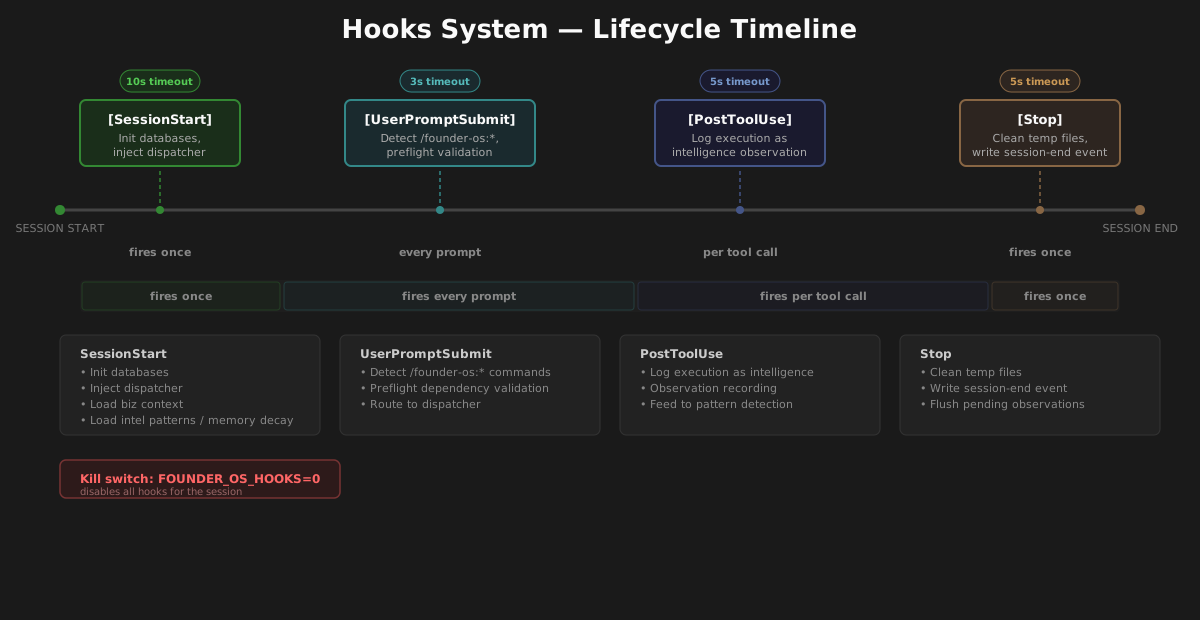
Founder OS registers scripts for four of Claude Code's lifecycle events. Each fires at a specific moment during your session:
| Hook Event | When It Fires | What FOS Does | Timeout |
|---|---|---|---|
| SessionStart | Once, when Claude Code opens your project | Initializes databases, injects dispatcher rules, loads business context and intelligence patterns, runs memory decay | 10s |
| UserPromptSubmit | Every time you press Enter on a prompt | Checks if the prompt is a /founder-os:* command and runs preflight dependency validation |
3s |
| PostToolUse | After a tool call completes (scoped to Skill calls only) |
Logs the command execution as an intelligence observation | 5s |
| Stop | When the Claude Code session ends | Cleans up temp files and writes a session-end event to the intelligence database | 5s |
The hooks run as Node.js scripts via the node command. Each has a timeout to prevent a misbehaving hook from stalling your session. If a hook exceeds its timeout, Claude Code terminates it and continues normally.
The Kill Switch
Every hook script checks a single environment variable before doing anything:
FOUNDER_OS_HOOKS=0Set this to 0 or false, and every hook exits immediately with no output. This is useful when you need to:
- Debug an issue and want to rule out hooks as the cause
- Run Claude Code in a minimal mode for performance testing
- Temporarily disable Founder OS without uninstalling it
You can set it for a single session:
FOUNDER_OS_HOOKS=0 claudeOr export it in your shell profile to keep hooks disabled across sessions:
export FOUNDER_OS_HOOKS=0Remove the variable (or set it to any value other than 0 or false) to re-enable hooks. No restart of Claude Code is required beyond starting a new session.
How Hooks Are Registered
Claude Code discovers hooks through your project's .claude/settings.json file. When you install Founder OS, the installer reads the hook registry and merges the entries into your settings file, preserving any hooks you have already configured.
The resulting structure in .claude/settings.json looks like this:
{
  "permissions": {
    "allow": [
      "Bash(npx founder-os*)",
      "Bash(node .founderOS/scripts/*)"
    ]
  },
  "hooks": {
    "SessionStart": [
      {
        "matcher": "",
        "hooks": [
          {
            "type": "command",
            "command": "node .founderOS/scripts/hooks/session-start.mjs",
            "timeout": 10000
          }
        ]
      }
    ],
    "UserPromptSubmit": [
      {
        "matcher": "",
        "hooks": [
          {
            "type": "command",
            "command": "node .founderOS/scripts/hooks/prompt-submit.mjs",
            "timeout": 3000
          }
        ]
      }
    ],
    "PostToolUse": [
      {
        "matcher": "Skill",
        "hooks": [
          {
            "type": "command",
            "command": "node .founderOS/scripts/hooks/post-tool.mjs",
            "timeout": 5000
          }
        ]
      }
    ],
    "Stop": [
      {
        "matcher": "",
        "hooks": [
          {
            "type": "command",
            "command": "node .founderOS/scripts/hooks/stop.mjs",
            "timeout": 5000
          }
        ]
      }
    ]
  }
}
Key concepts
Matcher-based scoping. Each hook group has a matcher field. An empty string ("") means the hook fires for all events of that type. The PostToolUse hook uses "Skill" as its matcher, which tells Claude Code to only fire this hook after Skill tool calls -- not after every Bash command or file read. This keeps overhead minimal.
Permissions. The permissions.allow array grants Claude Code permission to run the hook scripts without prompting you for approval each time. The two entries cover the Founder OS CLI (npx founder-os*) and the hook scripts themselves (node .founderOS/scripts/*).
Non-destructive merge. The installer never overwrites your existing hooks or permissions. It appends Founder OS entries alongside whatever you already have. If you uninstall, only the Founder OS entries are removed -- your custom hooks remain untouched.
The Hook Registry
The hook registry is the source of truth for which hooks Founder OS installs. It lives at:
.founderOS/infrastructure/hooks/hook-registry.json
This JSON file defines every hook event, its matcher, the script to run, and the timeout. The installer reads this file during setup and during updates, using it to merge the correct entries into .claude/settings.json.
The registry uses a versioned format:
{
  "version": 2,
  "hooks": {
    "SessionStart": [
      {
        "matcher": "",
        "hooks": [
          {
            "type": "command",
            "command": "node .founderOS/scripts/hooks/session-start.mjs",
            "timeout": 10000
          }
        ]
      }
    ]
  }
}
The version field allows the installer to detect format changes across Founder OS releases. When you update Founder OS, the merge logic handles backward compatibility automatically -- cleaning up hooks from older formats (such as flat-format entries from early versions) and adding new ones without duplication.
You should not edit the hook registry directly. If you want to add your own hooks, add them to .claude/settings.json alongside the Founder OS entries (see Extending with Custom Hooks below).
Each Hook in Detail
What Happens During SessionStart?
Script: .founderOS/scripts/hooks/session-start.mjs
Timeout: 10 seconds
Matcher: "" (fires on every session start)
This is the most substantial hook. It runs once when you open Claude Code in a Founder OS project, and it does five things:
1. Database initialization
The hook initializes two local SQLite databases if they do not already exist:
- Memory database (
.memory/memory.db) -- stores learned preferences, patterns, and observations across sessions. The schema includes tables for memories, observations, and adaptations. - Intelligence database (
.founderOS/infrastructure/intelligence/.data/intelligence.db) -- stores usage events, detected patterns, and active intelligence rules. The schema includes 8 tables covering events, patterns, and session state.
Both use CREATE TABLE IF NOT EXISTS statements, so re-running the init is safe. The hook writes a session state file to /tmp/ so that subsequent operations within the same session can skip re-initialization.
2. Dispatcher rules injection
The hook outputs the Founder OS dispatcher rules as structured text that Claude Code reads into its context. These rules tell Claude Code how to handle any /founder-os:* command:
- Read the command file's YAML frontmatter for
execution-mode - Check for
--foregroundor--backgrounduser overrides - If background: spawn a subagent with
run_in_background: true - If foreground: execute inline in the main session
This injection means the dispatcher behavior is loaded at session start rather than re-read on every command invocation, keeping each command execution fast.
3. Business context loading
The hook scans .founderOS/infrastructure/context/active/ for markdown files containing your business context (company info, strategy, key clients). If any files exist, it lists their paths in the output so Claude Code can reference them when executing commands. This is how your daily briefing knows about your actual clients instead of generating generic content.
4. Intelligence pattern loading
If the intelligence database exists and contains active or approved patterns, the hook loads the top 5 (sorted by confidence) and includes them in the session context. These are learned behaviors -- for example, if you always format reports a certain way, the intelligence engine promotes that as a pattern, and this hook ensures it is available from the start of every session.
5. Memory decay
Once per day (tracked by a marker file in /tmp/), the hook runs a decay pass over the memory database. Memories that have not been accessed in 30 days lose 5 confidence points. Memories that drop below a confidence score of 10 are deleted. This prevents the memory store from accumulating stale entries that no longer reflect your current preferences.
What Does the UserPromptSubmit Hook Do?
Script: .founderOS/scripts/hooks/prompt-submit.mjs
Timeout: 3 seconds
Matcher: "" (fires on every prompt submission)
This hook intercepts every prompt you submit and checks whether it contains a /founder-os:* command. If it does not, the hook exits silently with no output -- zero overhead for normal conversation.
When a Founder OS command is detected, the hook:
- Locates the command file at
.claude/commands/{namespace}/{action}.md - Parses the YAML frontmatter for dependency declarations
- Validates MCP dependencies (
requires-mcpfield) -- checks that the required MCP server config files exist in.founderOS/infrastructure/mcp-configs/ - Validates file dependencies (
requires-filesfield) -- checks that required files exist on disk
The hook produces one of three outcomes:
| Outcome | Output | Effect |
|---|---|---|
| Ready | No output | Command proceeds normally |
| Degraded | [Preflight: DEGRADED] with warnings |
Command runs, but Claude Code sees the warnings and can adapt (e.g., skipping an optional data source) |
| Blocked | [Preflight: BLOCKED] with error details |
Claude Code sees the block message and can present fix instructions to you before attempting the command |
This preflight system prevents the frustrating experience of running a long command only to have it fail halfway through because Notion is not connected or a required file is missing.
PostToolUse: Intelligence Observation Logging
Script: .founderOS/scripts/hooks/post-tool.mjs
Timeout: 5 seconds
Matcher: "Skill" (fires only after Skill tool calls)
This hook is scoped exclusively to Skill tool calls -- it does not fire after Bash commands, file reads, or other tool invocations. This scoping is intentional and keeps the hook from adding latency to the dozens of tool calls that happen during a typical command execution.
When a Skill call completes, the hook:
- Parses the tool event from stdin (JSON with
tool_nameandtool_inputfields) - Filters for Founder OS commands -- only Skill calls where the skill name includes
founder-osare logged - Extracts namespace and action from the skill name (e.g.,
founder-os:inbox:triageyields namespaceinbox, actiontriage) - Writes an event record to the intelligence database with the session ID, namespace, action, event type, and a success outcome
Over time, these observation records feed the Intelligence Engine's pattern detection. If the system sees that you run inbox:triage every morning followed by briefing:briefing, it can learn that sequence and suggest it proactively. The PostToolUse hook is the raw data collection layer that makes this possible.
Stop: Cleanup and Session Summary
Script: .founderOS/scripts/hooks/stop.mjs
Timeout: 5 seconds
Matcher: "" (fires on every session end)
This hook runs when your Claude Code session ends -- whether you close the window, run /exit, or the session times out. It handles two responsibilities:
1. Temp file cleanup
During a session, Founder OS creates several temporary files in /tmp/ namespaced by a hash of your project path:
fos-session-init-{hash}.json-- session initialization statefos-exec-{hash}-*-- execution artifactsfos-decay-{hash}.txt-- memory decay marker
The Stop hook deletes all of these. This prevents temp file accumulation across sessions and ensures the next session starts with a clean slate.
2. Session-end event
If the intelligence database exists, the hook writes a session_end event with the current timestamp. This bookends the session in the event log, making it possible to analyze session duration, command patterns per session, and usage trends over time.
Extending with Custom Hooks
You can add your own hooks alongside the Founder OS hooks by editing .claude/settings.json directly. Your custom hooks will survive Founder OS updates because the merge logic only touches entries that reference .founderOS in their command paths.
Example: Add a custom SessionStart hook
Suppose you want to inject your team's coding standards into every session. Create a script:
// .my-hooks/inject-standards.mjs
import fs from 'node:fs';

const standards = fs.readFileSync('.my-hooks/coding-standards.md', 'utf-8');
console.log(`## Team Coding Standards\n\n${standards}`);
Then add it to .claude/settings.json as a new entry in the SessionStart array:
{
  "hooks": {
    "SessionStart": [
      {
        "matcher": "",
        "hooks": [
          {
            "type": "command",
            "command": "node .founderOS/scripts/hooks/session-start.mjs",
            "timeout": 10000
          }
        ]
      },
      {
        "matcher": "",
        "hooks": [
          {
            "type": "command",
            "command": "node .my-hooks/inject-standards.mjs",
            "timeout": 5000
          }
        ]
      }
    ]
  }
}
Both hooks will fire on session start. Claude Code runs them in order and combines their outputs.
Example: Add a PostToolUse hook for Bash commands
The Founder OS PostToolUse hook only watches Skill calls. If you want to log all Bash commands, add a separate matcher group:
{
  "matcher": "Bash",
  "hooks": [
    {
      "type": "command",
      "command": "node .my-hooks/log-bash.mjs",
      "timeout": 3000
    }
  ]
}
Add this object to the PostToolUse array in .claude/settings.json. It will fire after every Bash tool call without affecting the Founder OS Skill-scoped hook.
Tips for custom hooks
- Keep hooks fast. The timeout is a safety net, not a target. Aim for sub-second execution.
- Use stdout for context injection. Anything a hook prints to stdout becomes part of Claude Code's context for that interaction.
- Use stdin for event data. The
UserPromptSubmitandPostToolUsehooks receive JSON event data on stdin. Parse it to react to specific commands or tool calls. - Fail silently. If your hook encounters an error, exit with code 0 and no output rather than crashing. A failing hook should never block the user's workflow.
- Namespace your temp files. Follow the Founder OS pattern of hashing the project root to create unique temp file names. This prevents collisions when running multiple projects.
Troubleshooting
Hooks are not firing
Check the kill switch. Run echo $FOUNDER_OS_HOOKS in your terminal. If it outputs 0 or false, hooks are disabled. Unset the variable and start a new session.
Check settings.json. Open .claude/settings.json and verify the hooks section exists with the expected entries. If it is missing, re-run the installer:
npx founder-osThe installer will re-merge the hook entries from the registry without touching your other settings.
Check permissions. The permissions.allow array must include Bash(node .founderOS/scripts/*). Without this, Claude Code will prompt for approval on every hook execution, which effectively prevents them from running in the background.
A hook is timing out
Each hook has a timeout defined in settings.json (in milliseconds). If a hook consistently times out:
- SessionStart (10s): This is the most likely to be slow because it initializes databases. Check that
sqlite3is installed and accessible on your PATH. Runwhich sqlite3to verify. - UserPromptSubmit (3s): This hook has a built-in 2.5-second safety timeout. If your filesystem is slow (e.g., network-mounted drives), the file existence checks may take too long.
- PostToolUse (5s): Usually fast since it is a single database write. If the intelligence database is locked by another process, the hook retries up to 3 times with 500ms delays, which could approach the timeout.
Memory decay is not running
The decay pass runs once per 24 hours, tracked by a marker file at /tmp/fos-decay-{hash}.txt. If you suspect decay is not running:
- Delete the marker file:
rm /tmp/fos-decay-*.txt - Start a new Claude Code session
- Check the memory database:
sqlite3 .memory/memory.db "SELECT COUNT(*) FROM memories WHERE confidence < 10"
Intelligence patterns are not loading
The SessionStart hook loads patterns from the intelligence database only if they have a status of active or approved. Check the database directly:
sqlite3 .founderOS/infrastructure/intelligence/.data/intelligence.db \
  "SELECT description, status, confidence FROM patterns ORDER BY confidence DESC LIMIT 10"
If no patterns exist yet, that is normal for new installations. Patterns are created by the Intelligence Engine as it observes your usage over time. See the Intelligence Engine deep dive for details.
Preflight says BLOCKED but the tool is installed
The preflight hook checks for MCP config files in .founderOS/infrastructure/mcp-configs/, not for the actual tool installation. If the tool is installed but the config file is missing, run the relevant setup command:
/founder-os:setup:notion-hq
This will create the config file and the preflight check will pass on the next command invocation.
Hooks from an older version are still present
When you update Founder OS, the installer cleans up hooks from previous versions automatically. If you see duplicate or stale entries in .claude/settings.json, run the installer again:
npx founder-osThe merge logic detects old-format entries (such as flat-format hooks from v1.1.0) and replaces them with the current registry format.
Related Pages
- Architecture Overview -- How hooks fit into the broader Founder OS system
- Intelligence Engine -- The pattern detection system that hooks feed data into
- Memory Engine -- How learned preferences persist across sessions
- Getting Started -- Installation and initial setup