Evals Framework
Every command in Founder OS produces output that shapes your decisions -- email drafts, meeting briefs, invoices, competitive analyses. The evals framework is the quality assurance layer that scores those outputs automatically, catches regressions before they reach you, and drives the system to improve over time.
You never have to run evals manually. They fire after every command execution as part of the intelligence engine's post-task hooks. But understanding how they work gives you the ability to tune scoring, add custom rubrics for your workflows, and interpret the health reports that surface when quality drifts.
What Is the Universal Scoring Rubric?
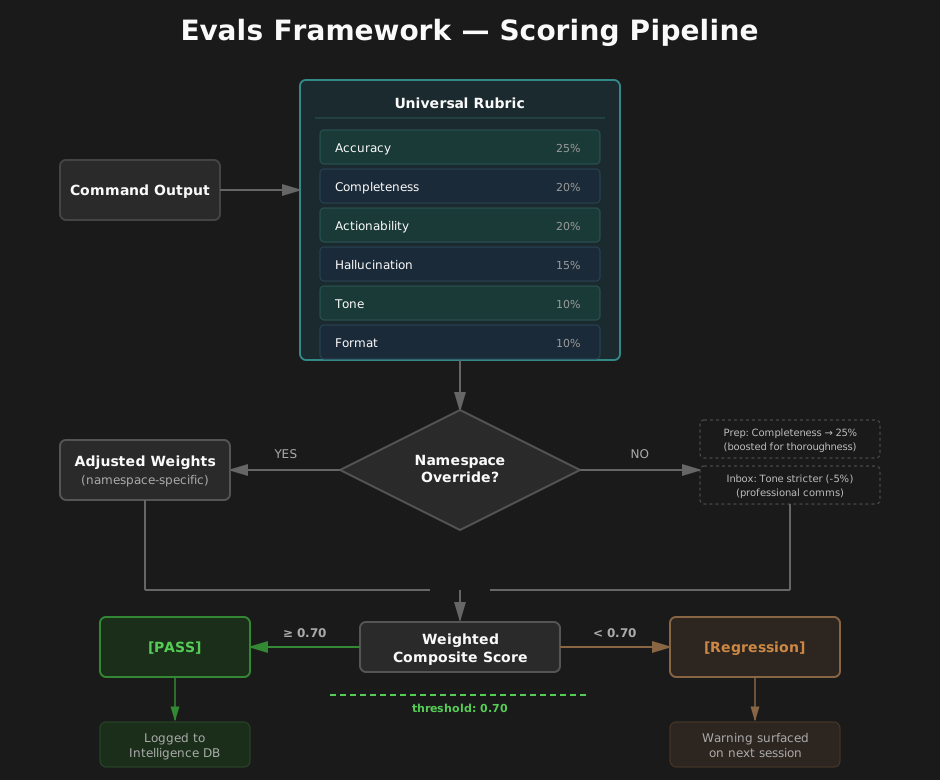
At the heart of the evals system is a universal rubric that applies to every command across all 32 command namespaces. It defines six scoring dimensions, each weighted by its relative importance to output quality:
| Dimension | Weight | What It Measures |
|---|---|---|
| Accuracy | 25% | Facts, numbers, and references are correct and verifiable against source data |
| Completeness | 20% | All requested sections and elements are present with no placeholder text |
| Actionability | 20% | Contains a clear next step or call-to-action the user can act on immediately |
| Hallucination | 15% | No fabricated entities, events, or data points -- all claims supported by context |
| Tone | 10% | Register matches the context (formal/casual), no inappropriately aggressive language |
| Format | 10% | Follows expected output structure and appropriate length for the context |
A weighted composite score is computed from these six dimensions. The passing threshold is 0.70 -- outputs scoring below that trigger regression tracking and can surface warnings on your next session.
Namespace-Specific Overrides
The universal rubric provides sensible defaults, but different commands have different quality priorities. A meeting prep brief needs to emphasize completeness (agenda items, attendees, prior action items), while an email draft cares more about tone and actionability. Namespace overrides let each command family tune the rubric without replacing it.
Here is how the override system works in practice:
Meeting Prep (prep) raises the completeness weight to 0.25 and the actionability weight to 0.20, reflecting that a prep brief must include agenda items with time allocations, all attendees with roles, and framed discussion questions. It also tightens format requirements -- outputs must contain "Agenda" and "Attendees" sections, with a minimum of 100 words.
Inbox (inbox) adds a stricter tone criterion ("matches founder voice profile, correct recipient salutation") and requires "Subject:" and "Body:" sections in every draft. The forbidden patterns list adds "Dear Sir/Madam" to catch generic salutations. Word count bounds tighten to 50-500, appropriate for email.
Invoice (invoice) shifts heavily toward accuracy (weight 0.35) and completeness (0.30), because financial documents must get the math right. Its accuracy criterion is arithmetic: line items times quantities must equal subtotal, tax must equal rate times subtotal, total must equal subtotal plus tax. Notably, invoices set the Tier 2 sample rate to 0.0 -- they rely entirely on deterministic checks because LLM self-critique is unreliable for numerical verification.
When an override is loaded, it merges with the universal rubric. Override weights are automatically re-normalized to sum to 1.0, so you only need to specify the dimensions you want to change. Unspecified dimensions keep their universal defaults.
How Does the Three-Tier Eval Pipeline Work?
Every command execution flows through a multi-tier pipeline. Each tier adds depth while controlling cost -- the cheapest checks run on every execution, and expensive LLM-based evaluation only fires on a sample.
Tier 0: Telemetry Collection
Runs on: 100% of executions | Cost: $0 | Latency: <1ms
Before any quality checks, the pipeline captures operational telemetry:
- Namespace and command -- which command was executed (e.g.,
inbox:triage) - Token counts -- input and output token usage
- Duration -- wall-clock execution time in milliseconds
- Content hashes -- SHA-256 hashes of input and output for deduplication and drift detection
- Output preview -- first 500 characters stored for quick inspection
This data is inserted into the exec_log table. Even if no quality evaluation runs, you have a complete execution history -- how often each command runs, how long it takes, and how token usage trends over time. The intelligence engine's /founder-os:intel:status command draws on this data to show execution frequency and resource consumption.
Tier 1: Deterministic Format Checks
Runs on: 100% of executions | Cost: $0 | Latency: <5ms
Tier 1 applies fast, deterministic validations derived from the rubric's tier1 configuration:
- Non-empty output -- the command produced something.
- Required sections -- checks that expected headings or markers are present in the output. For example, a
prepcommand must include "Agenda" and "Attendees". - Word count bounds -- output falls within the
min_words/max_wordsrange. An email draft below 50 words is likely incomplete; one above 500 is likely rambling. - Forbidden patterns -- catches placeholder text and template artifacts. The universal rubric flags
[PLACEHOLDER],INSERT_NAME,{name},TODO:, andFIXME:. Namespace overrides can add domain-specific patterns (e.g., "Dear Sir/Madam" for inbox). - JSON schema validation -- for structured outputs like invoices, verifies that required fields are present. The invoice rubric requires
line_items,subtotal,total, anddue_date.
The JSON schema check intelligently extracts JSON from the output, whether it appears in a markdown code block or inline. It then validates that every required field exists in the parsed object.
Tier 1 results update the execution log with a pass/fail flag and detailed diagnostics. A Tier 1 failure automatically escalates the execution to Tier 2 sampling -- if the basic structure is wrong, the system wants to understand why.
Tier 2: LLM Self-Critique (Sampled)
Runs on: ~20% random sample + all Tier 1 failures | Cost: ~$0.005/eval
When an execution is sampled for Tier 2, the system invokes an LLM judge that evaluates the output against the rubric's scoring criteria. The judge uses boolean rubric items (pass/fail per dimension) rather than Likert scales -- research shows this produces more reliable and calibrated scores from LLM evaluators.
The sampling logic follows two rules:
- Tier 1 failures always trigger Tier 2 -- if the basic format checks failed, the system needs to understand the severity.
- Passing executions are sampled at the rubric's configured rate -- 20% by default, adjustable per namespace. Prep commands sample at 25% (higher value output justifies more scrutiny). Invoice commands sample at 0% (deterministic checks are sufficient for financial data).
When sample rate is set to 0, Tier 2 never fires -- the namespace relies entirely on deterministic checks.
Score Storage and EWMA Tracking
Every Tier 2 evaluation is stored in the eval_results table with the individual dimension scores, a composite score, and the evaluator's reasoning. Alongside the raw score, the system maintains an Exponentially Weighted Moving Average (EWMA) for each namespace.
EWMA smooths out noise from individual evaluations to reveal quality trends. The smoothing factor (alpha = 0.15) means recent evaluations have more influence, but a single bad output does not tank the overall score. The formula:
new_ewma = 0.15 * current_score + 0.85 * previous_ewma
This EWMA score is the foundation for regression detection. When a namespace's EWMA drops below 0.65, the system flags a regression warning. To avoid alert fatigue, the same regression is only warned once per 30-minute window. The warning message directs you to run /founder-os:intel:health for a detailed quality report.
How to Create Custom Rubrics
The rubric system is file-based and designed for extension. Every rubric is a JSON file in the _infrastructure/intelligence/evals/rubrics/ directory.
Step 1: Understand the Rubric Structure
A rubric has two tiers of configuration:
{
  "namespace": "your-namespace",
  "tier1": {
    "required_sections": ["Section A", "Section B"],
    "min_words": 50,
    "max_words": 2000,
    "forbidden_patterns": ["[PLACEHOLDER]", "TODO:"],
    "required_json_fields": null
  },
  "tier2": {
    "sample_rate": 0.20,
    "weights": {
      "completeness": 0.25,
      "accuracy": 0.25,
      "actionability": 0.20,
      "tone": 0.15,
      "format": 0.10,
      "hallucination": 0.05
    },
    "criteria": {
      "completeness": "Describe what 'complete' means for this namespace",
      "accuracy": "Describe what 'accurate' means for this namespace"
    },
    "threshold": 0.70
  }
}
Tier 1 fields:
| Field | Type | Purpose |
|---|---|---|
required_sections |
string[] | Text markers that must appear in the output |
min_words / max_words |
number | Word count bounds |
forbidden_patterns |
string[] | Strings that must not appear (merged with universal) |
required_json_fields |
string[] or null | For structured outputs, required top-level JSON keys |
Tier 2 fields:
| Field | Type | Purpose |
|---|---|---|
sample_rate |
0.0 - 1.0 | Fraction of passing executions to evaluate (0 = deterministic only) |
weights |
object | Dimension weights (auto-normalized to sum to 1.0) |
criteria |
object | Natural-language scoring criteria per dimension |
threshold |
number | Minimum composite score to pass (default 0.70) |
Step 2: Create Your Override File
Create a new JSON file at:
development/_infrastructure/intelligence/evals/rubrics/overrides/<namespace>.json
You only need to include the fields you want to override. Everything else inherits from the universal rubric. For example, a custom rubric for a report namespace that emphasizes accuracy and requires specific sections:
{
  "namespace": "report",
  "tier1": {
    "required_sections": ["Executive Summary", "Key Findings", "Recommendations"],
    "min_words": 200,
    "max_words": 4000
  },
  "tier2": {
    "sample_rate": 0.30,
    "weights": {
      "accuracy": 0.30,
      "completeness": 0.25
    },
    "criteria": {
      "accuracy": "All metrics match source data, calculations are correct, trend descriptions align with numbers",
      "completeness": "Executive summary, all requested KPIs, and forward-looking recommendations are present"
    }
  }
}
Step 3: Validate Your Rubric
Run the eval runner in check mode to verify your rubric loads correctly:
node development/_infrastructure/intelligence/evals/eval-runner.mjs \
  --namespace report \
  --command generate \
  --output-text "Your sample output here..." \
  --tokens-in 500 --tokens-out 1200 --duration-ms 2800
The runner will output a JSON result showing whether Tier 1 passed and whether the execution was sampled for Tier 2. If there is a syntax error in your rubric JSON, the runner will fail with a descriptive error.
Guidelines for Effective Rubrics
- Be specific in criteria descriptions. "Output is good" tells the LLM judge nothing. "All line items from the source document are present with correct quantities and unit prices" gives it a clear checklist.
- Set sample_rate to 0 for deterministic outputs. If your command produces structured data where correctness can be verified by schema checks alone (e.g., invoices, JSON exports), skip LLM evaluation entirely.
- Tighten word count bounds. Generous bounds catch fewer problems. If your email drafts should be 2-4 paragraphs, set min_words to 50 and max_words to 500.
- Add domain-specific forbidden patterns. If your namespace should never produce certain phrases (e.g., competitor names in client-facing drafts), add them to
forbidden_patterns.
Integration with the Intelligence Engine
The evals framework does not exist in isolation -- it is a core component of the intelligence engine that powers Founder OS's self-improving behavior. Here is how the pieces connect.
The Learning Cycle
The intelligence engine follows an Observe, Retrieve, Judge, Distill, Consolidate, Apply loop. Evals power the Observe and Judge stages:
- Observe -- Tier 0 telemetry logs every execution to
exec_log. This is the raw event stream. - Judge -- Tier 1 and Tier 2 evals score the output quality and write results to
eval_results. - Distill -- High-scoring outputs (composite score > 0.8) become candidate patterns -- examples of what good output looks like for that namespace.
- Consolidate -- EWMA scores advance patterns through the lifecycle: candidate, active, approved, or rejected. Similar patterns are merged. A/B tests compare competing approaches.
- Apply -- Active patterns are injected as few-shot examples into future command executions, improving output quality without manual prompt engineering.
Health Monitoring
The eval database supports a health reporting view that powers /founder-os:intel:health. This report aggregates:
- Total executions and evaluations over the past 30 days
- Per-namespace EWMA scores -- trending quality for each command family
- Lowest-scoring dimensions -- which quality aspects (accuracy, tone, etc.) are weakest across the system, helping you prioritize rubric tuning
- Active regressions -- namespaces where EWMA has dropped below 0.65
Data Retention
Eval data is retained for 90 days by default. A lightweight cleanup runs automatically every 100 executions, removing records older than the retention window. This keeps the SQLite database compact while preserving enough history for trend analysis and regression detection.
Example: Evaluating a Daily Briefing
Let's walk through what happens when you run /founder-os:briefing:briefing and the evals pipeline processes the output.
1. Command Executes
The briefing command gathers data from Gmail, Calendar, Notion, and Slack, then generates a morning briefing. The output is approximately 400 words and includes sections for calendar highlights, email priorities, task deadlines, and a recommended focus for the day.
2. Tier 0: Telemetry Captured
The pipeline immediately logs:
{
  "namespace": "briefing",
  "command": "briefing",
  "inputHash": "a3f8c1...",
  "outputHash": "7b2e4d...",
  "outputPreview": "# Daily Briefing - March 19, 2026\n\n## Calendar...",
  "tokenInput": 1850,
  "tokenOutput": 620,
  "durationMs": 4200
}
3. Tier 1: Format Checks Pass
The briefing namespace uses the universal rubric defaults (no override file). The format checker runs:
- Non-empty: Pass (400 words of content)
- Min words (10): Pass (400 > 10)
- Max words (5000): Pass (400 < 5000)
- Forbidden patterns: Pass (no
[PLACEHOLDER],TODO:, etc. found) - Required JSON fields: Skipped (not configured)
Result: Tier 1 passes.
4. Sampling Decision
With Tier 1 passing and the default sample rate of 20%, the sampler rolls a random number. Let's say this execution is sampled (roughly 1 in 5 executions will be).
5. Tier 2: LLM Judge Evaluates
The judge evaluates the briefing output against all six dimensions:
| Dimension | Score | Reasoning |
|---|---|---|
| Completeness | 1.0 | Calendar, email, tasks, and focus sections all present |
| Accuracy | 1.0 | Meeting times match calendar data, email counts verified |
| Actionability | 0.8 | Focus recommendation included but could be more specific |
| Tone | 1.0 | Professional, concise, appropriate for morning scan |
| Format | 1.0 | Clean markdown structure, appropriate length |
| Hallucination | 1.0 | All items traceable to source data |
Composite score: (0.20 * 1.0) + (0.25 * 1.0) + (0.20 * 0.8) + (0.10 * 1.0) + (0.10 * 1.0) + (0.15 * 1.0) = 0.96
This comfortably exceeds the 0.70 threshold. The EWMA updates:
new_ewma = 0.15 * 0.96 + 0.85 * 0.91 = 0.917
The briefing namespace remains healthy. No regression warning fires.
6. What Would Trigger a Warning?
Imagine a code change to the briefing command accidentally drops the calendar section. Over the next few days:
- Tier 1 would still pass (no required sections configured for briefing by default)
- Tier 2 samples would score low on completeness (0.0 -- missing calendar data)
- The EWMA would gradually decline: 0.91 ... 0.84 ... 0.77 ... 0.69 ... 0.64
- Once EWMA drops below 0.65, the regression check triggers a warning
This is where a custom rubric adds value. By creating a briefing.json override with "required_sections": ["Calendar", "Email", "Tasks"], the Tier 1 check would catch the missing section immediately -- on 100% of executions, at zero cost -- rather than waiting for the EWMA to drift.
Key Takeaways
- Evals run automatically on every command execution. No manual setup needed.
- Three tiers of depth -- telemetry (free, always), format checks (free, always), LLM critique (sampled) -- balance thoroughness with cost.
- Namespace overrides let you tune scoring for domain-specific quality requirements without modifying the core system.
- EWMA regression tracking catches gradual quality drift and surfaces warnings before it compounds.
- Custom rubrics are simple JSON files -- drop one into the overrides directory, and the pipeline picks it up on the next execution.
- The eval pipeline feeds the intelligence engine's learning cycle, turning quality scores into pattern improvements that make future outputs better.