Agent Teams
Most Founder OS commands run as a single agent -- fast, lightweight, and effective for everyday use. When a task benefits from specialized roles working together, you can activate a multi-agent team with the --team flag. Agent teams bring deeper analysis, parallel data gathering, quality review passes, and richer output.
What Are Agent Teams?
An agent team is a group of 3-6 specialized agents that collaborate on a task using a defined pattern. Each agent has a focused role -- one fetches email, another extracts data, another writes prose, and another runs quality checks. The team's lead agent coordinates the pipeline and produces the final output.
Teams are activated with --team on the relevant command. Without the flag, the same command runs in single-agent mode: faster, lighter, and sufficient for most situations.
Team Patterns
Founder OS uses four distinct orchestration patterns across its 10 agent teams. The pattern determines how agents coordinate -- sequentially, in parallel, competitively, or asynchronously.
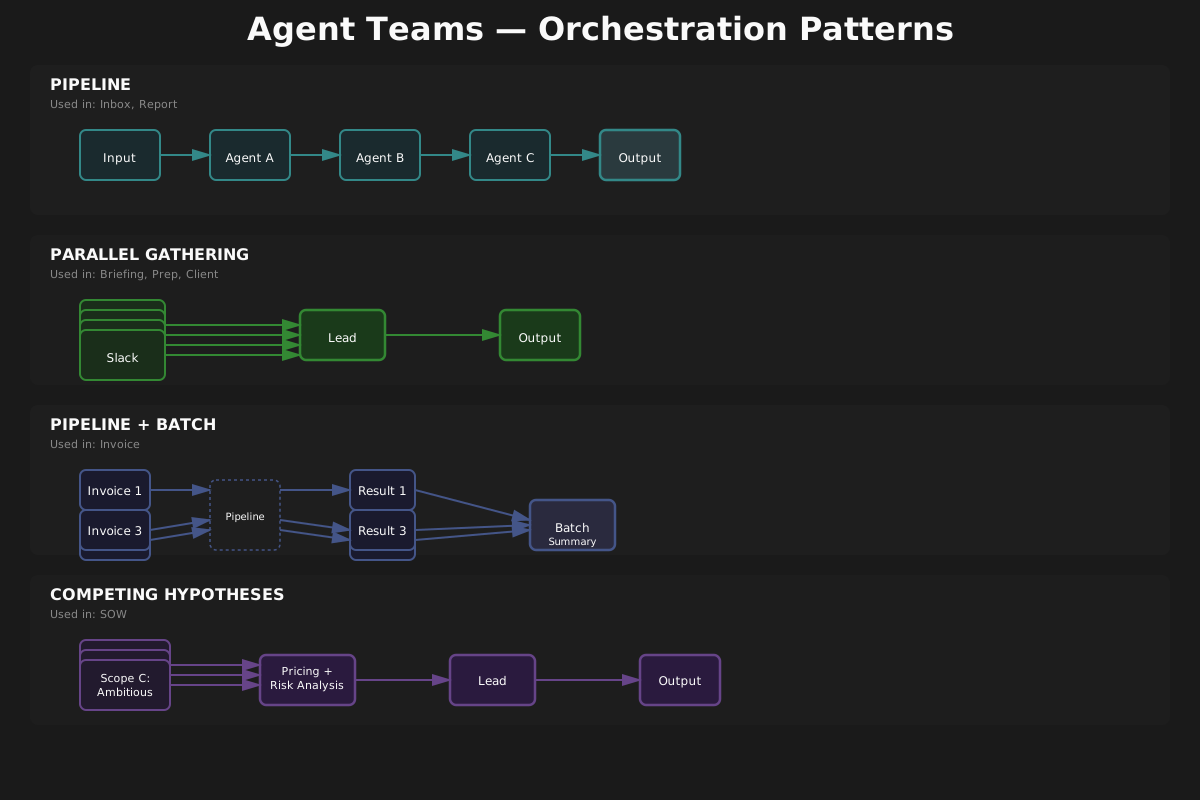
Pipeline (Sequential Processing)
Agents run in strict sequence. Each agent's output feeds directly into the next agent's input. If any step fails, downstream agents do not run. Best for tasks with clear stage gates where each phase transforms or enriches the data.
Used by: Inbox Zero, Report Generator, Invoice Processor, Social Media
Parallel Gathering (Fan-Out + Lead Synthesis)
Multiple gatherer agents fetch data from different sources simultaneously. A lead agent waits for all results, then synthesizes them into a unified output. Partial results are acceptable -- if one source times out, the rest still contribute.
Used by: Daily Briefing, Meeting Prep, Client Context, Scout
Competing Hypotheses (Multiple Approaches Merged)
Multiple agents independently interpret the same input, each producing a different solution. Evaluation agents assess all proposals, and a lead agent synthesizes the best elements into a final output. Best for tasks where the "right" answer depends on perspective.
Used by: SOW Generator
Background Evaluator (Async Quality Checking)
A single agent runs automatically in the background after command execution. It scores output quality against a rubric and feeds results into the Intelligence Engine. The user never invokes this directly.
Used by: Intelligence (Eval Judge)
All 10 Agent Teams
| Team | Pattern | Agents | What It Does |
|---|---|---|---|
| Inbox Zero | Pipeline | 4 | Triage, extract action items, draft replies, and recommend archiving across your full inbox |
| Daily Briefing | Parallel Gathering | 5 | Fetch calendar, email, tasks, and Slack in parallel, then compile a structured daily briefing |
| Meeting Prep | Parallel Gathering | 5 | Gather attendee profiles, email history, CRM context, and documents, then synthesize a prep dossier |
| Client Context | Parallel Gathering | 6 | Pull CRM, email, calendar, Drive, and meeting notes in parallel to build a unified client dossier |
| Report Generator | Pipeline | 5 | Research, analyze, write, format, and QA a data-driven business report in sequence |
| Invoice Processor | Pipeline (Batch) | 5 | Extract, validate, categorize, route approval, and record invoices -- up to 5 in parallel per batch |
| SOW Generator | Competing Hypotheses | 6 | Three scope agents propose independent options, risk and pricing agents evaluate, lead synthesizes |
| Scout | Parallel Gathering | 4 | Three researchers search different source tiers in parallel, synthesizer ranks and deduplicates |
| Social Media | Pipeline | 5 | Adapt content per platform, preview for approval, handle media, publish, and monitor delivery |
| Intelligence | Background Evaluator | 1 | Eval Judge scores command outputs against rubrics asynchronously via post-task hooks |
When Should I Use --team vs. Default Mode?
Use default mode (no --team) when you want:
- A fast result in seconds rather than a minute
- A quick scan or summary rather than an exhaustive report
- To process a single item rather than a batch
- To check on something without creating Notion records
Use --team when you want:
- Deep, multi-source analysis (briefing, client context, meeting prep)
- Full pipeline processing with Notion integration (inbox, reports, invoices)
- Competing perspectives on a deliverable (SOW generation)
- Multi-platform publishing with preview approval (social media)
- Exhaustive tool discovery across source tiers (scout)
A good rule of thumb: start with default mode for everyday use. Switch to --team when the output matters enough to justify the extra processing time -- client deliverables, investor reports, Monday morning inbox processing, and anything you plan to share externally.